Manu

Friday, 27 February 2026

Python Learning Session-12: File Handling in Python


Session-14: File Handling in Python

Read, Write, CSV, JSON & Context Managers — Practical Guide

Files are where your programs persist data—logs, configs, user data, analytics, you name it. In this session, you’ll learn how to safely read and write files, process CSV and JSON, and avoid common pitfalls.


Table of Contents

  1. #why-file-handling
  2. #opening-files-modes--encodings
  3. #reading-files-text
  4. #writing--appending
  5. #the-with-statement-context-managers
  6. #working-with-csv
  7. #working-with-json
  8. #paths-existence--errors
  9. #best-practices--pitfalls
  10. #mini-project-simple-log-analyzer
  11. #faqs
  12. #summary--next-steps

Why File Handling?

  • Persist data across runs (e.g., configs, user data).
  • Exchange data with other systems via CSV/JSON.
  • Log activity and errors for debugging & audits.

Opening Files: Modes & Encodings

Common modes

  • 'r' — read (default)
  • 'w' — write (truncate/create)
  • 'a' — append (create if not exists)
  • 'x' — create, fail if exists
  • Add 'b' for binary: e.g., 'rb' (images, PDFs)
  • Add '+' for read/write: e.g., 'r+', 'w+'

Encoding Use encoding="utf-8" for text files (handles most languages).

Python

# Open a file for reading text with UTF-8

f = open("notes.txt", mode="r", encoding="utf-8")

content = f.read()

f.close()

Show more lines

Tip: Prefer the with statement to auto-close files (see below).


Reading Files (Text)

Python

# Read entire file

with open("notes.txt", "r", encoding="utf-8") as f:

text = f.read()


# Read line by line (memory-friendly)

with open("notes.txt", "r", encoding="utf-8") as f:

for line in f:

print(line.strip())


# Read all lines into a list

with open("notes.txt", "r", encoding="utf-8") as f:

lines = f.readlines() # includes newline characters

Show more lines


Writing & Appending

Python

# Overwrite (or create) a file

with open("output.txt", "w", encoding="utf-8") as f:

f.write("First line\n")

f.write("Second line\n")


# Append to an existing file

with open("output.txt", "a", encoding="utf-8") as f:

f.write("Appended line\n")


# Write multiple lines

lines = ["alpha\n", "beta\n", "gamma\n"]

with open("list.txt", "w", encoding="utf-8") as f:

f.writelines(lines)

Show more lines


The with Statement (Context Managers)

with ensures the file is closed even if an exception occurs.

Python

from pathlib import Path


path = Path("data/info.txt")

path.parent.mkdir(parents=True, exist_ok=True) # ensure folder exists


with open(path, "w", encoding="utf-8") as f:

f.write("Safe write with context manager.\n")


Show more lines


Working with CSV

Use Python’s built-in csv module for spreadsheet-like data.

Python

import csv


# Write CSV (list of dicts)

rows = [

{"name": "Hitesh", "role": "Engineer", "score": 92},

{"name": "Anita", "role": "Analyst", "score": 88},

]

with open("people.csv", "w", newline="", encoding="utf-8") as f:

writer = csv.DictWriter(f, fieldnames=["name", "role", "score"])

writer.writeheader()

writer.writerows(rows)


# Read CSV

with open("people.csv", "r", encoding="utf-8") as f:

reader = csv.DictReader(f)

for row in reader:

print(row["name"], row["score"])

Show more lines

Note: newline="" prevents extra blank lines on Windows when writing CSVs.


Working with JSON

Use json for structured data (APIs, configs, settings).

Python

import json


config = {

"app": "blogtools",

"version": "1.0.0",

"features": ["slugify", "reading_time"],

"debug": True

}


# Write JSON (pretty)

with open("config.json", "w", encoding="utf-8") as f:

json.dump(config, f, ensure_ascii=False, indent=2)


# Read JSON

with open("config.json", "r", encoding="utf-8") as f:

data = json.load(f)


# Convert between Python object <-> JSON string

json_str = json.dumps(config) # to string

config2 = json.loads(json_str) # from string


Show more lines

Tip: Use ensure_ascii=False to keep non-English characters readable.


Paths, Existence & Errors

Use pathlib for clean, cross-platform paths.

Python

from pathlib import Path


p = Path("data") / "inputs" / "file.txt"


if p.exists():

print("File exists:", p.resolve())

else:

print("Not found:", p)


# Safely create directories

p.parent.mkdir(parents=True, exist_ok=True)

Show more lines

Handling exceptions

Python

from pathlib import Path


try:

with open("missing.txt", "r", encoding="utf-8") as f:

content = f.read()

except FileNotFoundError:

print("The file does not exist.")

except PermissionError:

print("Permission denied.")

except OSError as e:

print("OS error:", e)

Show more lines


Best Practices & Pitfalls

Do:

  • Use with open(...) to ensure closing.
  • Specify encoding="utf-8" for text files.
  • Use csv.DictReader/DictWriter for clarity.
  • Use json.dump(..., indent=2) for human-readable configs.
  • Prefer pathlib.Path over raw strings for paths.

Avoid:

  • Reading huge files fully into memory—iterate line by line.
  • String concatenation for paths (use Path).
  • Silent failures—log/raise meaningful errors.
  • Writing partial files—consider writing to a temp file then renaming for critical ops.

Performance Tips:

  • For large reads, process in chunks or stream line-by-line.
  • Use binary modes ('rb'/'wb') for non-text (images, PDFs).
  • Buffering is automatic; rarely tweak unless profiling suggests.

Mini-Project: Simple Log Analyzer

Goal: Read an application log, compute stats, and write a summary JSON.

Sample app.log (create it):

2025-12-15 10:01:10 INFO User logged in

2025-12-15 10:03:22 ERROR Failed DB connection

2025-12-15 10:05:05 WARNING High memory usage

2025-12-15 10:06:42 INFO Page rendered

2025-12-15 10:08:00 ERROR Timeout on API

analyze_logs.py:

Python

from pathlib import Path

import json

from collections import Counter


def parse_log(path: Path) -> Counter:

"""

Count log levels (INFO/WARNING/ERROR) from a simple space-delimited log.

"""

level_counts = Counter()

with open(path, "r", encoding="utf-8") as f:

for line in f:

parts = line.strip().split()

if len(parts) >= 3:

level = parts[2] # INFO, WARNING, ERROR

level_counts[level] += 1

return level_counts


def write_summary(summary: dict, out_path: Path) -> None:

out_path.parent.mkdir(parents=True, exist_ok=True)

with open(out_path, "w", encoding="utf-8") as f:

json.dump(summary, f, indent=2, ensure_ascii=False)


def main():

log_path = Path("app.log")

if not log_path.exists():

print("Log file not found:", log_path)

return


counts = parse_log(log_path)

total = sum(counts.values())


summary = {

"total_lines": total,

"counts": dict(counts),

"has_errors": counts.get("ERROR", 0) > 0

}


write_summary(summary, Path("reports/summary.json"))

print("Summary written to reports/summary.json")


if __name__ == "__main__":

main()

Show more lines

Run:

Shell

python analyze_logs.py

Show more lines

Output reports/summary.json:

JSON

{

"total_lines": 5,

"counts": {

"INFO": 2,

"ERROR": 2,

"WARNING": 1

},

"has_errors": true


Show more lines


FAQs

Q1. What encoding should I use?
Use utf-8 unless you know the file’s specific encoding.

Q2. Why do I see extra blank lines in CSV on Windows?
Open the file with newline="" when writing using csv to avoid extra blanks.

Q3. When should I use JSON vs CSV?

  • CSV: Tabular, spreadsheet-like data.
  • JSON: Nested, hierarchical, or configuration data.

Q4. How do I read big files efficiently?
Iterate line-by-line (for line in f:), or process in chunks.


Summary & Next Steps

In this session, you learned:

  • Safe open/read/write patterns for files.
  • Processing CSV and JSON.
  • Using context managers and pathlib.
  • Handling errors and encodings.

Up next: Exception handling in depth (try/except/else/finally, custom exceptions), and logging best practices to complement file I/O.


Tuesday, 16 December 2025

Python Learning Session-11 Functions, Modules & Packages in Python


Functions, Modules & Packages in Python

Reusable, Organized & Scalable Code — A Practical Guide

If you’ve mastered lists, tuples, sets, and dictionaries, the next step is structuring your code. In this guide, we’ll learn how to make your code reusable with functions and organized with modules and packages — the foundation of any production-grade Python project.


Table of Contents

  1. Why Functions?
  2. Defining & Calling Functions
  3. Parameters, Arguments & Return Values
  4. Default, Keyword, *args, **kwargs
  5. Scope, Closures & Lambda
  6. Docstrings & Type Hints
  7. Modules: Importing & Organizing
  8. Packages: Structure & __init__.py
  9. Best Practices & Pitfalls
  10. Mini Project: A Reusable Utility Package
  11. FAQs
  12. Summary & Next Steps

Why Functions?

Functions let you name logic, reuse it, test it independently, and keep code readable.

Benefits

  • Avoid repetition (DRY principle).
  • Encapsulate logic.
  • Easier testing and debugging.
  • Clear inputs/outputs.

Defining & Calling Functions

Python

def greet(name):

"""Return a friendly greeting."""

return f"Hello, {name}!"


print(greet("Hitesh")) # Hello, Hitesh!

``

Show more lines

Multiple returns

Python

def divide(a, b):

if b == 0:

return None, "Cannot divide by zero."

return a / b, None


result, error = divide(10, 2)

Show more lines


Parameters, Arguments & Return Values

Python

def area_of_rectangle(width: float, height: float) -> float:

return width * height


w = 5.0

h = 2.5

print(area_of_rectangle(w, h)) # 12.5

Show more lines

Return dictionaries for structured data

Python

def analyze(numbers):

return {

"count": len(numbers),

"sum": sum(numbers),

"mean": sum(numbers) / len(numbers) if numbers else 0

}

Show more lines


Default, Keyword, *args, **kwargs

Python

def power(base, exponent=2):

return base ** exponent


print(power(3)) # 9 (default exponent)

print(power(3, 3)) # 27

print(power(exponent=4, base=2)) # 16

Show more lines

Python

def total(*args):

return sum(args)


print

Show more lines

Python

def greet_user(**kwargs):

return f"Hello, {kwargs.get('name', 'Guest')} from {kwargs.get('city', 'Unknown')}!"


print(greet_user(name="Hitesh", city="Jafrabad"))

``

Show more lines

Tip: Use *args for flexible positional inputs, **kwargs for flexible named inputs.


Scope, Closures & Lambda

Scope

  • Local: Inside a function.
  • Global: Module-level.
  • Enclosing: Outer function for nested functions.
  • Built-in: Python’s built-ins like len, sum.

Python

x = 10

def foo():

x = 5 # local shadows global

return x

Show more lines

global & nonlocal

Python

count = 0

def increment():

global count

count += 1

``

Show more lines

Python

def outer():

total = 0

def inner():

nonlocal total

total += 1

return total

return inner

``

Show more lines

Lambda (small anonymous functions)

Python

square = lambda x: x**2

print(square(6)) # 36

Show more lines

Use lambdas sparingly; prefer def for readability.


Docstrings & Type Hints

Python

def add(a: int, b: int) -> int:

"""

Add two integers.


Args:

a (int): First number.

b (int): Second number.


Returns:

int: Sum.

"""

return a + b

Show more lines

Type hints improve clarity and tooling (linters, IDEs). They are optional at runtime.


Modules: Importing & Organizing

A module is any .py file that can be imported.

Import styles

Python

# Basic imports

import math

from math import sqrt, pi

from math import sqrt as square_root


# Your own module (file: utils.py)

# utils.py

def slugify(text):

return text.lower().replace(" ", "-")


# main.py

from utils import slugify

print(slugify("Hello World")) # hello-world

``

Show less

Code block expanded

Executable modules

Use the common entry point:

Python

# main.py

def run():

print("App started")


if __name__ == "__main__":

run()

``

Show more lines


Packages: Structure & __init__.py

A package is a directory with Python modules and (optionally) __init__.py.

myapp/

myapp/

  __init__.py

  utils.py

  mathops/

    __init__.py

    └─ stats.py

main.py

requirements.txt

__init__.py controls what’s exposed

Python

# myapp/mathops/__init__.py

from .stats import mean, median

__all__ = ["mean", "median"]

Show more lines

Relative imports inside packages

Python

# myapp/utils.py

def safe_div(a, b):

return a / b if b else None


# myapp/mathops/stats.py

from ..utils import safe_div


def mean(values):

return safe_div(sum(values), len(values))

``

Show more lines

Tip: Keep imports explicit and avoid deep relative imports in large projects.


Best Practices & Pitfalls

Do:

  • Keep functions small and single-purpose.
  • Name functions with verbs: calculate_tax, fetch_data.
  • Write docstrings and type hints.
  • Group related functions into modules.
  • Use packages to organize features/domains.

Avoid:

  • Global mutable state (hard to debug).
  • Circular imports (module_a imports module_b and vice versa).
  • Overusing from x import * (namespace pollution).
  • Long parameter lists—prefer objects or dataclasses.

Mini Project: A Reusable Utility Package

Let’s build a simple blogtools package that:

  • Slugifies titles.
  • Estimates reading time.
  • Generates meta tags.
  • Provides text analytics (word stats).

Project Structure

blogtools/

blogtools/

  __init__.py

  meta.py

  text.py

  └─ utils.py

└─ demo.py

blogtools/utils.py

Python

import re


def slugify(title: str) -> str:

"""

Convert a title to a URL-friendly slug.

"""

slug = re.sub(r"[^\w\s-]", "", title).strip().lower()

slug = re.sub(r"[\s_-]+", "-", slug)

return slug

``

Show more lines

blogtools/text.py

Python

import math


AVERAGE_WPM = 200 # average reading speed


def word_count(text: str) -> int:

return len(text.split())


def reading_time(text: str) -> str:

minutes = max(1, math.ceil(word_count(text) / AVERAGE_WPM))

return f"{minutes} min read"


def summary(text: str, limit: int = 160) -> str:

s = " ".join(text.split())


Show more lines

blogtools/meta.py

Python

from .utils import slugify

from .text import reading_time, summary


def build_meta(title: str, body: str, tags=None) -> dict:

tags = tags or []

return {

"title": title,

"slug": slugify(title),

"description": summary(body),

"reading_time": reading_time(body),

"tags": tags,

}

``

Show more lines

blogtools/__init__.py

Python

from .meta import build_meta

from .text import word_count, reading_time, summary

from .utils import slugify


__all__ = [

"build_meta",

"word_count",

"reading_time",

"summary",

"slugify",

]

``

Show more lines

demo.py

Python

from blogtools import build_meta, slugify, reading_time


post_title = "Functions, Modules & Packages in Python — A Practical Guide"

post_body = """

Functions help you reuse code, while modules and packages help you organize it.

This guide walks through the essentials with examples and a mini project.

"""


meta = build_meta(post_title, post_body, tags=["Python", "Tutorial", "Beginner"])

print("Slug:", meta["slug"])

print("Reading Time:", meta["reading_time"])

print("Description:", meta["description"])

Show more lines

How to run: Place files as shown, then run python demo.py.


FAQs

Q1. Do I need __init__.py in every package?
A: In modern Python, namespace packages can work without it, but including __init__.py keeps behavior explicit and compatible across tools.

Q2. When should I use a module vs a package?
A: Use a module for a small set of related functions. Use a package when you need multiple modules grouped by feature/domain.

Q3. How do I avoid circular imports?
A: Move shared functions into a common module, import inside functions when needed, or refactor dependencies.


Summary & Next Steps

  • Functions: Make your logic reusable, testable, and clear.
  • Modules: Group related functions and keep files focused.
  • Packages: Organize features into a scalable structure.

Next: Add unit tests (pytest), use virtual environments (venv), and publish your package to PyPI.


Bonus: Copy-Paste Blog Intro (Social Caption)

Learn how to write clean, reusable Python with functions, and organize it like a pro using modules & packages. Includes examples, best practices, and a mini project you can run today. #Python #Coding #DevTips


Monday, 15 December 2025

Python Learning Session-10 : Dictionaries in Python –from lists, tuples and Key-Value Power!.


Session-10 : Dictionaries in Python –from lists, tuples and Key-Value Power!.

Learning Objectives

  • Understand what sets are in Python.
  • Learn how sets differ from lists and tuples.
  • Explore set operations (union, intersection, difference, symmetric difference).
  • Work with set methods like add(), remove(), discard(), update().
  • Understand immutability with frozenset.

📌 Key Concepts

  1. Definition:
    A set is an unordered collection of unique elements in Python.
    Example:

Python

my_set = {1, 2, 3, 3} # Output: {1, 2, 3}

Show more lines

  1. Why Sets?
    • Automatically removes duplicates.
    • Faster membership testing (in operator).
    • Useful for mathematical operations.
  2. Creating Sets:

Python

s1 = {1, 2, 3}

s2 = set([4, 5, 6])

empty_set = set() # {} creates a dictionary, not a set


Show more lines

  1. Common Operations:

Python

a = {1, 2, 3}

b = {3, 4, 5}


print(a | b) # Union: {1, 2, 3, 4, 5}

print(a & b) # Intersection: {3}

print(a - b) # Difference: {1, 2}

print(a ^ b) # Symmetric Difference: {1, 2, 4, 5}

Show more lines

  1. Methods:
    • add(), remove(), discard(), pop(), clear()
    • update() for merging sets.
  2. frozenset:
    • Immutable version of a set.

Python

fs = frozenset([1, 2, 3])

Show more lines


🛠 Practice Ideas

  • Remove duplicates from a list using a set.
  • Find common elements between two lists.
  • Write a program to check if two sets are disjoint.
  • Implement a simple set-based membership system.

Key-Value Power


Learning Objectives

  • Understand what dictionaries are and why they are useful.
  • Learn how to create, access, and modify dictionary elements.
  • Explore dictionary methods like get(), keys(), values(), items(), update().
  • Understand nested dictionaries and dictionary comprehensions.

📌 Key Concepts

  1. Definition:
    A dictionary is an unordered collection of key-value pairs.
    Example:

Python

my_dict = {"name": "Hitesh", "role": "Engineer"}

Show more lines

  1. Creating Dictionaries:

Python

d1 = {"a": 1, "b": 2}

d2 = dict(x=10, y=20)

empty_dict = {}

Show more lines

  1. Accessing & Modifying:

Python

print(d1["a"]) # 1

print(d1.get("c")) # None

d1["b"] = 5 # Modify value

d1["c"] = 3 # Add new key-value

Show more lines

  1. Common Methods:
    • keys(), values(), items()
    • update(), pop(), clear()
  2. Dictionary Comprehension:

Python

squares = {x: x**2 for x in range(5)}

Show more lines

  1. Nested Dictionaries:

Python

student = {

"name": "Hitesh",

"marks": {"math": 90, "science": 85}


Show more lines


🛠 Practice Ideas

  • Count word frequency in a sentence using a dictionary.
  • Merge two dictionaries.
  • Create a dictionary from two lists (keys and values).
  • Implement a simple phonebook using a dictionary.


Saturday, 13 December 2025

Python Learning Session-09: Tuples in Python – Immutable Collections!


Python Learning Session-09: Tuples in Python – Immutable Collections!


👋 Welcome Back!

We’ve learned about lists, which are flexible and allow changes. But what if you need a collection that should never change? That’s where Tuples come in. Tuples are like lists, but with one big difference: they are immutable.


What is a Tuple?

A tuple is an ordered collection of items, just like a list, but you cannot modify it after creation.

Why use tuples?

  • Protect data from accidental changes.
  • Faster than lists (because they’re immutable).
  • Commonly used for fixed data like coordinates, dates, or configuration settings.

Creating Tuples

Tuples use parentheses ():

Python

# Example of a tuple

colors = ("red", "green", "blue")

print(colors)

Show more lines

You can also create a tuple without parentheses:

Python

numbers = 1, 2, 3

Show more lines


Accessing Tuple Elements

Just like lists, tuples use indexing:

Python

print(colors[0]) # red

print(colors[-1]) # blue

Show more lines


Immutability in Action

Try changing a tuple:

Python

colors[0] = "yellow" # Error: 'tuple' object does not support item assignment

Show more lines

Why important? Tuples are perfect for data that should remain constant.


Tuple Operations

  • Concatenation

Python

tuple1 = (1, 2)

tuple2 = (3, 4)

print(tuple1 + tuple2) # (1, 2, 3, 4)

Show more lines

  • Repetition

Python

print(tuple1 * 3) # (1, 2, 1, 2, 1, 2)

Show more lines


Looping Through Tuples

Python

for color in colors:

print(color)

Show more lines


Tuple Methods

  • count(value) → Count occurrences
  • index(value) → Find position of value

Python

numbers = (1, 2, 2, 3)

print(numbers.count(2)) # 2

print(numbers.index(3)) # 3

Show more lines


Nested Tuples

Tuples can contain other tuples:

Python

nested = ((1, 2), (3, 4))

print(nested[0][1]) # 2

Show more lines


Summary

Tuples are simple, fast, and secure. Use them when you need fixed data that should never change.


🔥 Challenge for You

Create a tuple of 5 cities. Print them one by one. Then, try adding a new city and see what happens!


👉 Next Session: Session-10: Sets in Python – Unique Collections!


Friday, 12 December 2025

Python Learning Session-08: Dictionaries in Python – Key-Value Magic!


Python Learning Session-08: Dictionaries in Python – Key-Value Magic!


👋 Welcome Back!

We’ve explored lists, which are great for storing ordered collections. But what if you need to store data with labels? For example, a student’s name and their marks. Lists can do it, but it’s messy. Enter Dictionaries—Python’s way of storing data as key-value pairs.


 What is a Dictionary?

A dictionary is like a real-life dictionary: you look up a word (key) and get its meaning (value). In Python:

  • Keys are unique
  • Values can be anything (numbers, strings, lists, even another dictionary)
  • Defined using curly braces {}

Example:

Python

student = {

"name": "Alice",

"age": 21,

"marks": 85

}

print(student)

Show more lines

Output:

{'name': 'Alice', 'age': 21, 'marks': 85}

 Why useful? Perfect for structured data like user profiles, product details, etc.


 Creating Dictionaries

Python

# Empty dictionary

my_dict = {}


# Dictionary with data


Show more lines


 Accessing Values

Use the key:

Python

print(student["name"]) # Alice

Show more lines

 Pro Tip: If you use a key that doesn’t exist, Python throws an error. Use get() to avoid that:

Python

print(student.get("grade", "Not Available"))

Show more lines


 Adding & Updating Data

Python

student["grade"] = "A" # Add new key-value

student["marks"] = 90 # Update existing value

Show more lines


 Removing Data

  • pop() → Remove by key

Python

student.pop("age")

Show more lines

  • clear() → Remove all items

Python

student.clear()

Show more lines


 Looping Through Dictionaries

Python

for key, value in student.items():

print(key, ":", value)

Show more lines

 Real-world example: Displaying user details in a profile page.


 Dictionary Methods You’ll Love

  • keys() → All keys
  • values() → All values
  • items() → All key-value pairs

Example:

Python

print(student.keys())

print(student.values())

Show more lines


 Nested Dictionaries

Dictionaries inside dictionaries:

Python

students = {

"101": {"name": "Alice", "marks": 85},

"102": {"name": "Bob", "marks": 78}

}

print(students["101"]["name"]) # Alice

Show more lines

 Why powerful? Great for storing complex data like JSON.


 Summary

Dictionaries are the backbone of Python data handling. They’re fast, flexible, and perfect for real-world applications like APIs, databases, and configurations.


🔥 Challenge for You

Create a dictionary of 5 countries and their capitals. Then:

  • Print all keys and values
  • Add a new country
  • Remove one country

👉 Next Session: Session-09: Tuples in Python – Immutable Collections!


Monday, 8 December 2025

Python Learning Session-07: Working with Lists

Python Learning Session-07: Working with Lists


👋 Welcome Back!

If you’ve been following our Python journey, you already know how to work with strings. Today, we’re stepping into one of the most powerful tools in Python: Lists.

Think of a list like a shopping basket. You can throw in apples, bananas, and even a bottle of juice—all in one basket. Similarly, Python lists can hold multiple items, even of different types.


What is a List?

A list is a collection of items stored in a single variable. It’s like a container that keeps things organized.

Example:

Python

fruits = ["apple", "banana", "cherry"]

print(fruits)

Show more lines

Output:

['apple', 'banana', 'cherry']


Why Do We Need Lists?

Imagine you’re building a student management system. Instead of creating 100 variables for 100 students, you can store all names in one list. Simple, right?


Creating Lists

Python

numbers = [1, 2, 3, 4, 5]

mixed = [1, "hello", 3.14, True]

empty_list = []

Show more lines

Pro Tip: Lists can hold anything—numbers, strings, even other lists!


Accessing Items

Lists use indexing:

Python

fruits = ["apple", "banana", "cherry"]

print(fruits[0]) # apple

print(fruits[-1]) # cherry

Show more lines

Why important? Indexing helps you grab exactly what you need.


Updating Lists

Lists are mutable, meaning you can change them:

Python

fruits[1] = "orange"

print(fruits) # ['apple', 'orange', 'cherry']

Show more lines

Real-life example: Updating a product name in your online store.


Adding Items

  • append() → Add at the end

Python

fruits.append("grape")

Show more lines

  • insert() → Add at a specific position

Python

fruits.insert(1, "mango")

Show more lines

Why useful? Dynamic data handling without creating new lists.


Removing Items

  • remove() → Remove by value

Python

fruits.remove("apple")

Show more lines

  • pop() → Remove by index

Python

fruits.pop(0)


Show more lines

Use case: Removing sold-out items from inventory.


Looping Through Lists

Python

for fruit in fruits:

print(fruit)

Show more lines

Practical example: Displaying all items in a shopping cart.


List Comprehension

A smart way to create lists:

Python

squares = [x**2 for x in range(5)]

print(squares) # [0, 1, 4, 9, 16]

Show more lines

Why powerful? Less code, more clarity.


Summary

Lists are your best friend when you need to store and manage multiple values. They’re flexible, easy to use, and form the backbone of Python programming.


🔥 Challenge for You

Create a list of your favorite movies and print them one by one using a loop. Then, add a new movie to the list and remove one you don’t like anymore.


Tuesday, 5 March 2024

Python Learning Session –06 - Sting Data Type

string data type in Python:

  introduction about the string data type in python 

String is nothing but is only set of character i.e “Techshoot03” it set of alphabet characters “ T,e,c,h,s,h,o,o,0,3 ” . All the set of character are get to gather and make one word and set of words are call String.

 There are so many Data type are available in the programing all languages are same data type are used

 Lest we seen how many data type are available in programing.

·         Intrigue

·         Boolean

·         String

·         Double

·         Float

·         Complex

·         List

·         Tuple

·         Dict

·         Set

“Mastering Python Strings: A Comprehensive Guide”

Dive deep into string manipulation, slicing, and formatting techniques.

Cover common use cases and best practices for handling strings.


“Python String Methods Every Developer Should Know”

Explore essential string methods like split()join()replace(), and more.

Provide practical examples and tips for efficient string processing.


“Formatting Strings in Python: A Detailed Overview”

Discuss f-strings, .format(), and % formatting.

Explain when to use each method and their pros/cons.


“Exploring Python’s Built-in String Functions”

Highlight lesser-known string functions like isalpha()startswith(), and count().

Showcase their applications and performance considerations.


“String Manipulation in Python: Tips and Tricks for Efficiency”

Share tricks for optimizing string concatenation, searching, and case conversion.

Address memory usage and performance bottlenecks.


Example : -

Code : - a = “hello techshoot03”

Print (a)                   --  then press the enter and check the result as we seen in the snap

 Looking Inside Strings :

We can get at any single character in a string using an index specified in square brackets

The index value must be an integer and starts at zero

The index value can be an expression that is computed

Lest we more undartanding we go throw the code :

Code : -

>>> a = "hello Techshoot03"

>>> print ( a )

hello Techshoot03

>>> 

>>> a = 3

>>> b = a [a-1]

Traceback (most recent call last):

  File "<stdin>", line 1, in <module>

TypeError: 'int' object is not subscriptable

>>> demo = "hello techshoot03"

>>> test = demo[1]

>>> print (test)

e

>>> a = 3

>>> b = demo[a-1]

>>> print(b)

l

>>> 

The built-in function len gives us the length of a string

Code : -

 >>> demo = "hello techshoot03"

>>> print(len(demo))

17

>>> 


LEN A function is some stored code that we use. A function takes some input and produces an output.

Looping and Counting of Strings : -

This is a simple loop that loops through each letter in a string and counts the number of times the loop encounters the 'a' character

Slicing Strings: -

We can also look at any continuous section of a string using a colon operator

The second number is one beyond the end of the slice – “up to but not including”

If the second number is beyond the end of the string, it stops at the end

If we leave off the first number or the last number of the slice, it is assumed to be the beginning or end of the string respectively

 When the  +  operator is applied to strings, it means “concatenation”


The in keyword can also be used to check to see if one string is “in” another string

The in expression is a logical expression that returns True or False and can be used in an if statement


String Comparison :


String Library: -

·         str.capitalize()

·         str.center(width[, fillchar])

·         str.endswith(suffix[, start[, end]])

·         str.find(sub[, start[, end]])

·         str.lstrip([chars])

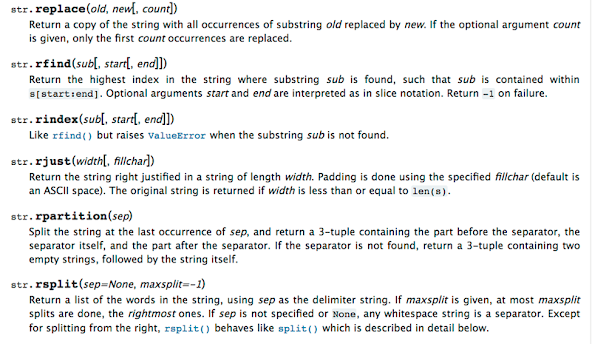
·         str.replace(old, new[, count])

·         str.lower()

·         str.rstrip([chars])

·         str.strip([chars])

·         str.upper()

Searching a String : -

We use the find() function to search for a substring within another string

find() finds the first occurrence of the substring

If the substring is not found, find() returns -1

Remember that string position starts at zero


Code : -

>>>demo = 'Techshoot03'

>>> test = demo.find('Te')

>>> print(test)

1 - --  Result


You can make a copy of a string in lower case or upper case

Often when we are searching for a string using find() we first convert the string to lower case so we can search a string regardless of case

The replace() function is like a “search and replace” operation in a word processor

It replaces all occurrences of the search string with the replacement string

Sometimes we want to take a string and remove whitespace at the beginning and/or end

lstrip() and rstrip() remove whitespace at the left or right

strip() removes both beginning and ending whitespace